The registration of an HOA with an annual revenue exceeding $5,000.00 does not become
active until you have paid the registration fee.
The HOA Registration system uses a wizard to step through the process of making a payment. To begin the process of making a payment, click on the Make Payment button located in the navigation menu. The Make Payment screen is displayed (see figure 1).
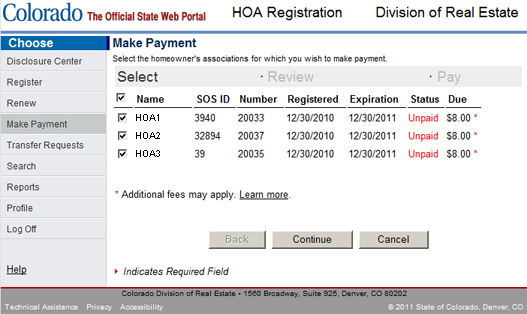
Figure 1
The Make Payment screen displays HOAs which you have registered that currently require a payment.
For each HOA, the name, secretary of state id, number, date registered, expiration date, status
and amount due are displayed. When an HOA appears on this screen, the status is always displayed
as unpaid. To the right of the amount field, you will see an asterisk indicating that additional
fees may apply.
Step 1: Select
With the Make Payment screen before you, ensure that the box located to the left of the HOA name is
checked for each HOA you wish to make a payment for and press the Continue button. Step 2: Review
The review panel of the Make Payment wizard displays the list of HOAs you selected on the previous
step of the Make Payment wizard. Some new fields are now displayed that list any fees that must be
applied to the payment. They are described in what follows:
| Subtotal | Sum of the payment for all listed HOAs |
| Transaction Fee | Fee charged by Colorado Interactive for making a payment -- always $0.75. |
| Credit Card Service Fee | Fee charged by credit card companies for processing an online payment |
| Total Payment | Total amount you will pay |
Review the information on this page and when you are satisfied that it is correct, press the continue button.
A warning appears to alert you that payment is collected by the Colorado Interactive payment portal.
You will temporarily leave the HOA Registration website to make the payment. Press the OK button to continue.
Step 3: Pay
Follow the directions listed on the Colorado Interactive website and complete the payment process. When you
have finished the process, you will be returned to the HOA Registration website.
Please note that all payments submitted to the Colorado Division of Real Estate are not refundable.
Buttons
| Back | Navigates back to the previous step in the make payment wizard. |
| Continue | Navigates to the next step of the wizard. |
| Cancel | Aborts the payment process and returns to the disclosure center. |