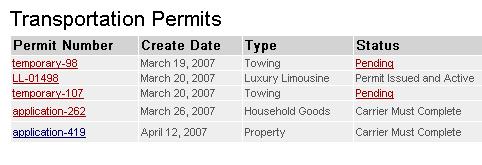
figure 1
Under the permit number column, note that each document is actually a hot link.
If you click on any submitted document that begins with the word application,
a copy of the application, suitable for printing is displayed in its own window.
To print a copy of the permit application, right-click anywhere on the screen and choose print from the resulting menu (see figure 2).
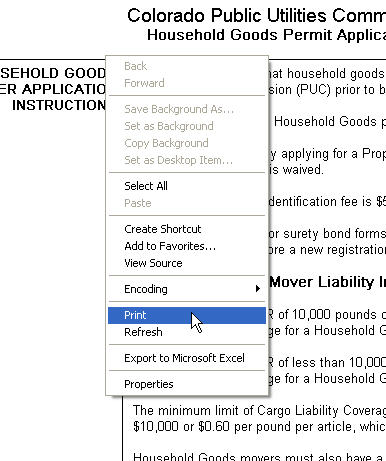
figure 2
When you are finished with the application you can close the window by clicking
on the window's close box (located in the upper right hand corner of the window)
or by clicking on the close button located at the end of the report.
Printing Permits
Once the permit has been issued, you may print a copy of the permit at any time.
However, you will no longer be able to print a copy of the application.
A list of issued permits are displayed on the Carrier Home screen with the issued permit number. Click on the issued permit number to display the issued permit in its own window. You can print the permit by right-clicking on the issued permit screen and choosing Print from the resulting context menu. When you are finished with the permit, click the close box located at the bottom of the permit.
You may print as many copies of the permit as you wish.