General Permit Application Requirements
This page describes in more detail the general part of a permit application.
Each of the sections below describes a wizard page that appears on every
permit application.
The instructions page tells you a little bit about how to fill out the application.
It also tells you how much the application costs and how much insurance you are
required to carry in order for the permit to be issued.
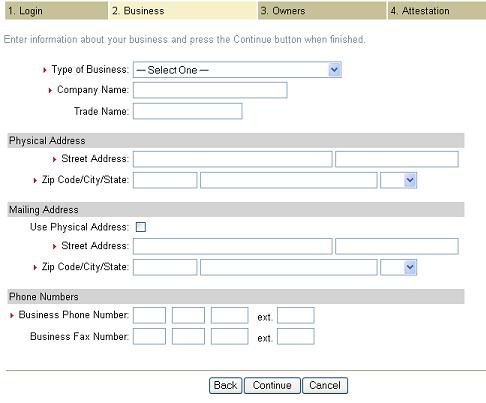
The business page allows you to provide information about your company. See figure 2.
Figure 2
Type of Business: Choose the type of business from the list that best matches the type of business you have.
Company Name: Enter the legal name of your company. Ideally, this is the same name that appears on your articles of incorporation.
Trade Name: Enter the registered trademark or registered brand of your business.
Street Address: Enter the physical street address where your business is officially located.
Zip Code/City/State: Enter the zip code, city and state where your business is officially located. The system automatically fills in the city and state based on the zip code, if possible.
Mailing Address: If you have a post office box or another mailing address that differs from your physical address, enter it here. Otherwise, check the Use Physical Address box.
Business Phone Number: Enter the phone number that is most likely to allow the Colorado Public Utilities Commission to contact you.
Business Fax Number: Enter the fax number of the business.
The Owners page provides a place to identify all of the owners of
your business. You must correctly identify every owner of your
business, including the person's title and the person's full
legal name.
When you choose a type of business on the Business page, the
system automatically displays an appropriate Owners page. For
example, if you chose Individual/Sole Proprietor, the system
displays a page with fields for a single owner. If you chose
Partnership, the system displays a page with up to five owners.
If you choose Government as your type of business, there is no
requirement for you to provide owner information.
An agent is a business or individual that you may optionally designate to
operate on your behalf. Note: some out of state operators may be required
to specify an agent. If this is the case, the agent fields will be
displayed as required fields.
If you choose to identify an agent, be sure to include the agent's full name
and address where they may be reached in the event of an emergency. If the
agent is a business, place the name of the business in the last name field.
The more information you provide about your agent, the better we are
able to serve you.
The attestation page describes your legal responsibilities in filling
out a transportation permit application and the consequences of
knowingly providing false information.
Read the attestation statement and check the box acknowledging that
you have read and understand the statement. Press the Create Account
button when you are ready to proceed.
The attestation page describes your legal responsibilities in filling
out a transportation permit application and the consequences of
knowingly providing false information.
Read the attestation statement and check the box acknowledging that
you have read and understand the statement. Press the Create Account
button when you are ready to proceed.