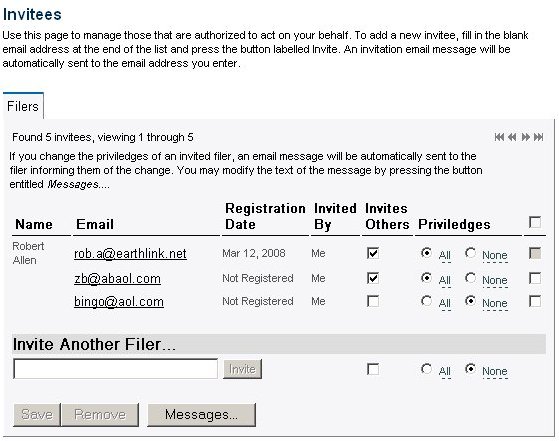
Figure 1
| Inviting others to file on your behalf |
In the section labeled Invite Another Filer..., enter the email address
of the person(s) who will file on your behalf. Filing in an email address
automatically activates the Invite button. You may also check the box in
the invites others column and set the new invitee's privileges to all or
none. When you click the invite button, the system automatically sends an email invitation to the email address you have entered, inviting the recipient to register on the E-Filings web site. Once the invitee has registered, Registration date field changes from a value of Not Registered to the date when the invitee registered on the E-Filings system. At any time, you may remove invitees, change their ability to invite others and change their privileges. |
| Fields | |
| Invites Others | When checked, the invites others field indicates that you have granted permission to the invitee to in turn invite others to file on your behalf. |
| Privileges | The privileges field indicates what an invitee is allowed to do on your behalf. If All is checked, the invitee may represent you in all matters before the commission. If None is checked, the invitee may not represent you for any matters before the commission. |
| Buttons | |
| Save | Saves the list of invitees. |
| Remove | Deletes all invitees that have their delete box checked. |
| Messages... | Display the email templates that are sent to those that file on your behalf. You can customize these templates to meet your needs. |